Top Social

Featured Posts Slider

Image Slider

Hiển thị các bài đăng có nhãn Thủ Thuật Blog. Hiển thị tất cả bài đăng
Thứ Sáu, 9 tháng 12, 2016

TĂNG TRAFFIC CHO BLOG VỚI HITLEAP CỰC KÌ ĐƠN GIẢN


TĂNG TRAFFIC CHO BLOG VỚI HITLEAP CỰC KÌ ĐƠN GIẢN


3.63 (72.5%) 8 votes
Xin chào các bạn. Cũng khá lâu rồi mình không đăng bài nào bởi đang phải dành nhiều thời gian cho học tập. Nhưng hôm nay mình đã trở lại và hi vọng và sẽ lợi hại hơn xưa. OK. Bắt đầu
Gợi ý : Download template blogger miễn phí
Như các bạn đã biết, để tăng traffic của website bạn phải trải qua nhiều bước như tối ưu hóa giao diện, tối ưu hóa nội dung, tối ưu hóa nội dung rồi không ngừng quảng bá blog trên các trang mạng xã hội Facebook, G+…. Bài viết này mình sẽ hướng dẫn các bạn cách tăng traffic cho blogvới Hitleap vô cùng đơn giản, không những không mất phí và còn kiếm được ra tiền.
Chủ Nhật, 23 tháng 10, 2016

Cách ẩn widget ở trang chủ

First try: hiding widget from home page

Example, you want to hide a widget from home page. First, please accessTemplate Edit HTML, then click Jump to widget button and select the widget you want to hide. In this example, I will hide my widget HTML1.
The normal HTML widget will have a full code like below:

<b:widget id='HTML1' locked='false' title='HTML Widget' type='HTML'>
 <b:includable id='main'>
  <!-- only display title if it's non-empty -->
  <b:if cond='data:title != &quot;&quot;'>
   <h2 class='title'>
    <data:title/>
   </h2>
  </b:if>
  <div class='widget-content'>
   <data:content/>
  </div>
  <b:include name='quickedit'/>
 </b:includable>
</b:widget>
Now, to hide this widget from home, please add below code after <b:includable id='main'> tag:

<b:if cond='data:blog.url == data:blog.homepageUrl'>
 <b:remove/>
</b:if>
The final code will  be like this:

<b:widget id='HTML1' locked='false' title='HTML Widget' type='HTML'>
 <b:includable id='main'>
  <b:if cond='data:blog.url == data:blog.homepageUrl'>
   <b:remove/>
  </b:if>
  <!-- only display title if it's non-empty -->
  <b:if cond='data:title != &quot;&quot;'>
   <h2 class='title'>
    <data:title/>
   </h2>
  </b:if>
  <div class='widget-content'>
   <data:content/>
  </div>
  <b:include name='quickedit'/>  </b:includable>
</b:widget>
Now, click Save template button and check your home page to see, the widget was completely removed. You can view source of home page and find the id of the widget (with my case is id=’HTML1′), you would not found anything. It’s magic 🙂

Explain how it works

The rule is simple: if a widget contains undefined Blogger tag, it will be removed completely.

In example code above, the line: <b:if cond='data:blog.url == data:blog.homepageUrl'> will check if this is the home page and the undefined tag <b:remove/> will help us removing the widget completely.
You can use another tag than <b:remove/>, but it must be an undefined tag of Blogger. Example: <b:return/><b:exit/><b:hide/>, .etc…

Hide from other pages

You can read more information about Blogger page type condition tags at: Blogger Basic Global Data Tags. In this article, I will list some basic example for hiding widgets for certain page types of Blogger as below:

Hide from home page


<b:if cond='data:blog.url == data:blog.homepageUrl'>
 <b:remove/>
</b:if>

Hide from index pages

(home, label, search page or all posts page (include home and its older posts pages).

<b:if cond='data:blog.pageType == &quot;index&quot;'>
 <b:remove/>
</b:if>

Hide from static pages


<b:if cond='data:blog.pageType == &quot;static_page&quot;'>
 <b:remove/>
</b:if>

Hide from item pages

(articles, posts)

<b:if cond='data:blog.pageType == &quot;item&quot;'>
 <b:remove/>
</b:if>

Hide from archive pages

(showing posts by months / years)

<b:if cond='data:blog.pageType == &quot;archive&quot;'>
 <b:remove/>
</b:if>

Hide from 404 pages


<b:if cond='data:blog.pageType == &quot;error_page&quot;'>
 <b:remove/>
</b:if>

Hide from mobile


<b:if cond='data:blog.isMobileRequest'>
 <b:remove/>
</b:if>

Showing instead of hiding

If you want to show instead of hide, you must use != instead of == . Example, if you want to show on home page, but hide from others, use this:

<b:if cond='data:blog.url != data:blog.homepageUrl'>
 <b:remove/>
</b:if>
If your case is not in the above list, please comment below then I can update a new code for you.
Thứ Ba, 10 tháng 5, 2016

Tạo điểm nhấn riêng phân biệt nhận xét của tác giả

DEMO bằng hình ảnh cho các bạn xem trước

☼ Giờ bắt đầu thủ thuật cùng Windows2it.

Vào Blog => Mẫu => Chỉnh sửa HTML. Nhấn tổ hợp phím Ctrl + F và tìm đến thẻ </head>. Sau đó dán đoạn mã Code sau lên phía trên thẻ </head> và Lưu mẫu.
Chủ Nhật, 23 tháng 8, 2015

SlideShow trình chiếu ảnh tuyệt đẹp cho blogspot (blogger) phần 1

Theo nguồn:windows2it
Chằn vào cột sitebar (vô cùng đơn giản) thường dùng cho quảng cáo

Đầu tiên bạn vào Blog => Bố cục => Thêm tiện ích => HTML/JavaScript và dán đoạn mã code dưới đây vào và Lưu lại.

<script type="text/javascript">
// Banner Rotation Script by Bloggerism
Thứ Năm, 20 tháng 8, 2015

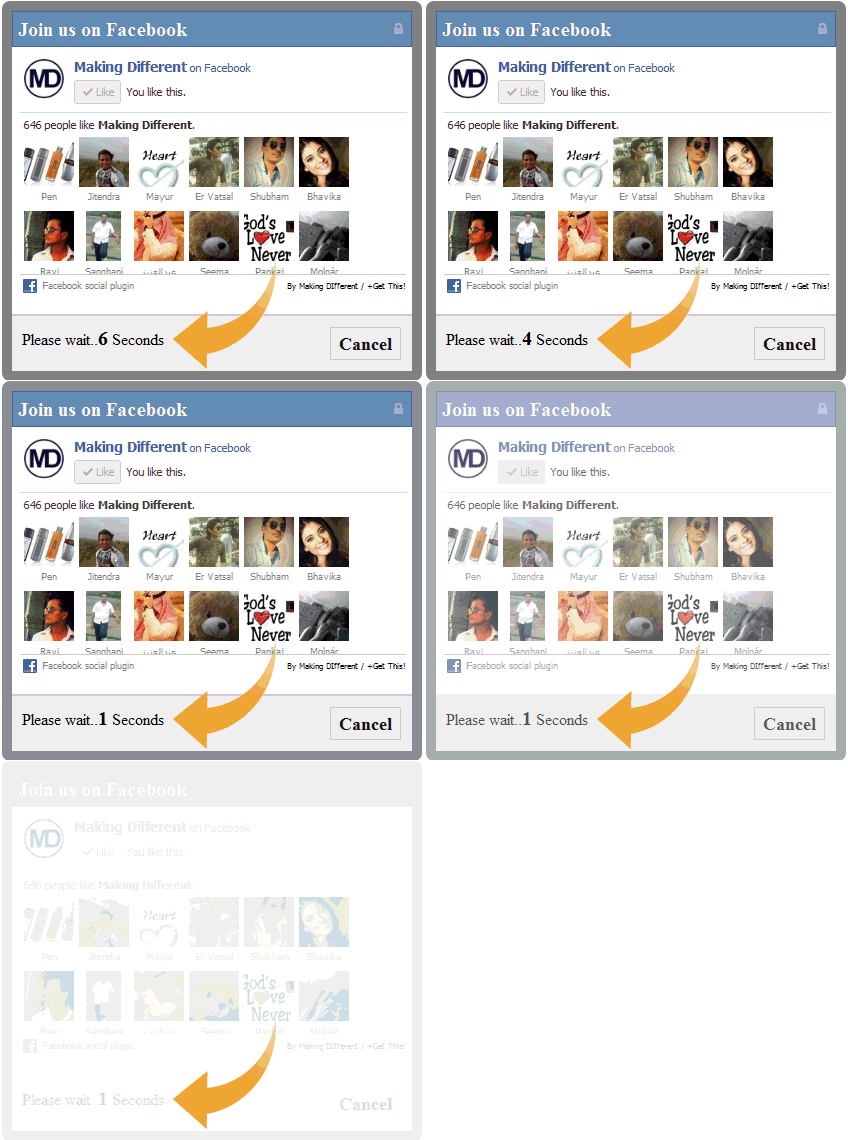
Popup hiển thị likebox của Fanpage facebook trên Blogspot (blogger)

Popup hiển thị likebox của Fanpage facebook trên Blogspot” thường thì có 2 dạng: Cài đặt thời gian và Mặc định. Bắt đầu thủ thuật cùng windows2it !

Chỉ cần chèn đoạn mã sau đây vào HTML của web hoặc vào một Widget HTML/Javascript

Đầu tiên bạn vào Blog => Bố cục => Thêm tiện ích => HTML/JavaScript và dán đoạn mã code dưới đây vào và Lưu lại.

Dạng 1: Dạng Cài đặt thời gian

Popup hiển thị likebox của Fanpage facebook trên Blogspot (blogger)

CODE
<script type="text/javascript" src="http://ajax.googleapis.com/ajax/libs/jquery/1.8.2/jquery.js"></script>
<style type='text/css'>
#makingdifferentpopup{
position: fixed;
top:100px;
z-index:9999;
display:none;
padding:0px;
right:600px;
border:10px solid rgba(82, 82, 82, 0.7);
-webkit-background-clip: padding-box; /* for Safari */
background-clip: padding-box; /* for IE9+, Firefox 4+, Opera, Chrome */
-webkit-border-radius:8px 8px 8px 8px;
-moz-border-radius:8px 8px 8px 8px;
border-radius:8px 8px 8px 8px;
width:400px;
height:360px;
overflow:hidden;
}
#makingdifferentpopup span{
font-size:20px !important;
font-weight:bold !important;
}
#makingdifferentpopup h1{
background:#6d84b4 url(https://blogger.googleusercontent.com/img/b/R29vZ2xl/AVvXsEgZ2Ttf4KygS8jJmh6vwzTyI8jHYZ4dev8GlVo1y_fOxpNziyU-P09l1j8bz5A90us-M05w8ma0sg9tzo3GR3E0II9JzXS52EjwnF8QNL5ReYRAQK6u5DtQVaQNaxRYIQrlkKgS0ZFet-l6/s1600/%255Bwww.gj37765.blogspot.com%255Dh1.png) 98% no-repeat;
border:1px solid #3b5998 !important;
color:#FFFFFF !important;
font-size:20px !important;
font-weight:700 !important;
padding:5px !important;
margin:0 !important;
font-family:"lucida grande",tahoma,verdana,arial,sans-serif !important;
overflow:hidden !important;
}
.htmlarea{
font-size:12px !important;
font-weight:normal !important;
height:265px !important;
padding:1px !important;
background:#fff !important;
border-bottom:2px solid #ddd;
overflow:hidden !important;
}
#mdfooter{
text-align:left;
background:#F2F2F2 !important;
height:56px !important;
padding:10px 10px 10px 10px !important;
overflow:hidden !important;
}
#mdclose{
float:right;
background-color:#eee !important;
border:1px solid #ccc !important;
color:#111 !important;
font-weight:bold !important;
padding:5px 8px 5px 8px !important;
text-decoration:none !important;
display:inline-block !important;
font-family:"lucida grande",tahoma,verdana,arial,sans-serif !important;
outline:none !important;
position:relative !important;
font-size:18px !important;
margin:1px !important;
}
#mdclose:active{
top:1px;
left:1px;
}
.grabthis{
bottom:80px;
font:8px "lucida grande",tahoma,verdana,arial,sans-serif;
position:absolute;
right:6px;
text-align:right;
z-index: 99999;
}
.grabthis a{
color: #000;
text-decoration:none;
}
.grabthis a:hover{
text-decoration:underline;
}
</style>
<script type='text/javascript'>
jQuery(document).ready(function() {
function makingdifferent_ppopup()  {var sec = 10
var timer = setInterval(function() {
   $("#mdfooter span").text(sec--);
   if (sec == 0) {
      $("#makingdifferentpopup").fadeOut("slow");
      clearInterval(timer);
   }
},1000);
  var mdwh = jQuery(window).height();
  var mdpph = jQuery("#makingdifferentpopup").height();
  var mdfromTop = jQuery(window).scrollTop()+50;
 jQuery("#makingdifferentpopup").css({"top":mdfromTop});}
jQuery(window).fadeIn(makingdifferent_ppopup)
.resize(makingdifferent_ppopup)
 //alert(jQuery.cookie('sreqshown'));
 //var mdww = jQuery(window).width();
 //var mdppw = jQuery("#makingdifferentpopup").width();
 //var mdleftm = (mdww-mdppw)/2;
   var mdleftm = 500;
 //var mdwh = jQuery(window).height();
 //var mdpph = jQuery("#makingdifferentpopup").height();
 //var mdfromTop = (jQuery(window).scrollTop()+mdwh-mdpph) / 2;
 jQuery("#makingdifferentpopup").animate({opacity: "1", left: "0" , left:  mdleftm}, 0).show();
     jQuery("#mdclose").click(function() {
jQuery("#makingdifferentpopup").animate({opacity: "0", left: "-5000000"}, 1000).show();});});
</script>
<div id="makingdifferentpopup">
<h1>Join us on Facebook</h1>
<div class="htmlarea">
<iframe src="//www.facebook.com/plugins/likebox.php?href=https://www.facebook.com/123tailieufree&amp;width=400&amp;colorscheme=light&amp;show_faces=true&amp;border_color=%23fff&amp;stream=false&amp;header=false&amp;height=250" scrolling="no" frameborder="0" style="border:none; overflow:hidden; width:400px; height:250px;" allowtransparency="true"></iframe>
<div class="grabthis">
By <a href="http://www.windows2it.com/" target="_blank">Making DIfferent</a> / <a href="http://www.windows2it.com/2015/08/popup-hien-thi-likebox-cua-fanpage-facebook-tren-blogspot-blogger.html" target="_blank">+Get This!</a>
</div>
</div>
<div id="mdfooter">Please wait..<span>10</span> Seconds<a href="#" id="mdclose" onclick="return false;">Cancel</a>
</div>
</div>
<!-- End popup -->  

Dạng 2: Dạng Mặc định


CODE 
<style scoped='' type='text/css'> 
#fb-fanbox {display:none;background:rgba(0,0,0,0.9);width:100%;height:100%;position:fixed;top:0;left:0;z-index:99999;-webkit-transform:translateZ(0);}
#fb-boxclose {width:100%;height:100%;-webkit-transform:translateZ(0);}
#fb-boxview {background:#fff;border:8px solid #03a9f4;width:340px;height:230px;position:absolute;top:33%;left:37%;border-radius:3px;}
#fb-closebox {float:right;cursor:pointer;position:absolute;right:-1px;top:-2px;z-index:2;}
#fb-closebox:before {content:"CLOSE";padding:5px 8px;background:#03a9f4;color:#fff;font-weight:normal;font-size:10px;font-family:inherit;}
#fb-boxlink,#fb-boxlink a.visited,#fb-boxlink a,#fb-boxlink a:hover {color:#aaaaaa;font-size:9px;text-decoration:none;text-align:center;padding:5px;}
</style>
<script type='text/javascript'>
//<![CDATA[
jQuery.cookie = function (key, value, options) {
// Pengaturan cookie
if (arguments.length > 1 && String(value) !== "[object Object]") {
options = jQuery.extend({}, options);
if (value === null || value === undefined) {
options.expires = -1;
}
if (typeof options.expires === 'number') {
var days = options.expires, t = options.expires = new Date();
t.setDate(t.getDate() + days);
}
value = String(value);
return (document.cookie = [
encodeURIComponent(key), '=',
options.raw ? value : encodeURIComponent(value),
options.expires ? '; expires=' + options.expires.toUTCString() : '', // use expires attribute, max-age is not supported by IE
options.path ? '; path=' + options.path : '',
options.domain ? '; domain=' + options.domain : '',
options.secure ? '; secure' : ''
].join(''));
}
// Dapatkan cookie
options = value || {};
var result, decode = options.raw ? function (s) { return s; } : decodeURIComponent;
return (result = new RegExp('(?:^|; )' + encodeURIComponent(key) + '=([^;]*)').exec(document.cookie)) ? decode(result[1]) : null;
};
//]]>
</script>
<script type='text/javascript'>
jQuery(document).ready(function($){
if($.cookie('popup_facebook_box') != 'yes'){
$('#fb-fanbox').delay(3000).fadeIn('fast');
$('#fb-closebox, #fb-boxclose').click(function(){
$('#fb-fanbox').stop().fadeOut('fast');
});
}
$.cookie('popup_facebook_box', 'yes', { path: '/', expires: 7 });
});
</script>
<div id='fb-fanbox'>
<div id='fb-boxclose'>
</div>
<div id='fb-boxview'>
<div id='fb-closebox'>
</div>
<iframe allowtransparency='true' frameborder='0' scrolling='no' src='//www.facebook.com/plugins/likebox.php?
href=https://www.facebook.com/123tailieufree&width=402&height=255&colorscheme=light&show_faces=true&show_border=false&stream=false&header=false'
style='border:none;overflow:hidden;width:339px;height:200px;'></iframe>
</div>
</div>
<div id='fb-root'/>
<script>
window.fbAsyncInit = function() {
FB.init({
appId : 'KODE-APLIKASI',
status : true, // check login status
cookie : false, // enable cookies to allow the server to access the session
xfbml : true // parse XFBML
});
};
(function() {
var e = document.createElement('script');
e.src = document.location.protocol + '//connect.facebook.net/en_US/all.js';
e.async = true;
document.getElementById('fb-root').appendChild(e);
}());
</script></div>

Chú ý: Thay 123tailieufree thành địa chỉ ID Page Facebook của bạn.

Kết luận

- Với cách trên mình hướng dẫn bạn chằn đoạn code đó vào 1 Widget => những đoạn code trong template không ảnh hưởng gì nên các bạn cứ vọc thỏa mái nhé. Còn bạn nào rồ hơn thì có thể chèn trực tiếp vào trong template.

- Các bạn hoàn toàn có thể tùy biến chiều cao, rộng của hộp like box của bạn nhé (ở trên là kích thước chuẩn rồi mình nghĩ các bạn không cần phải thay đổi)
Theo nguồn:windows2it